Best Golf Launch Monitors for Home Practice (Every Budget)
From £450 to £2,800: I compared 5 launch monitors on accuracy, data and real practice value. The best golf launch monitors for every budget in 2026.
This article contains affiliate links. I earn a small commission from purchases through these links. It helps keep Green Streak free and costs you nothing extra.
Prices are typical UK prices as of September 2026 and change often.
Quick Summary
- Radar monitors around £450 now track most of the core data tour pros use: ball speed, spin, launch angle and carry are all within reach
- The Garmin Approach R10 is my best overall pick: at ~£450 it gives you 12+ metrics, simulator compatibility and the strongest app set-up in its price range
- Consistency matters more than accuracy: for practice, a monitor that reads 3 yards off every time is more useful than one that's spot on only now and then
- Data needs a habit behind it: log your launch monitor sessions in the free Green Streak app and keep your practice streak going
An £18,000 Trackman used to be the only way to see what your golf ball was really doing. Now a device the size of a phone charger does much of the same job from your garage floor.
Quick Answer: The best launch monitor for home practice depends on your budget and goals. The Garmin Approach R10 (~£450) is the best overall value, with ball speed, spin, launch and carry plus simulator software included. Visual learners should look at the Rapsodo MLM2PRO (~£550) for its shot tracer video. For tour-level accuracy, there's the Bushnell Launch Pro (~£2,800). Buy for the data you'll actually use.
Table of Contents
- Quick-Pick Summary Table
- What Should I Look for in a Golf Launch Monitor
- What Data Actually Matters for Practice
- Individual Launch Monitor Reviews
- Garmin R10 vs Rapsodo MLM2PRO Head-to-Head
- Detailed Comparison Table
- Budget Breakdown by Price Tier
- Indoor vs Outdoor Performance
- Do I Really Need a Launch Monitor to Improve
- Final Verdict by Category
- Sources & Further Reading
- Related Articles
- Frequently Asked Questions
Quick-Pick Summary Table
| Category | Monitor | Price | Best For | |----------|---------|-------|----------| | Best Overall | Garmin Approach R10 | £££ (~£450) | Best value for features, simulation, and app ecosystem | | Best Visual Feedback | Rapsodo MLM2PRO | £££ (~£550) | Golfers who want shot tracer video with every swing | | Best Portable | Swing Caddie SC4 | £££ (~£600) | Quick range sessions and travel-friendly simplicity | | Best Premium | FlightScope Mevo+ | ££££ (~£2,200) | Data-obsessed golfers who want premium radar accuracy | | Best Tour-Level Accuracy | Bushnell Launch Pro (GC3) | ££££ (~£2,800) | Club fitters, teaching pros, and serious low-handicappers |
What Should I Look for in a Golf Launch Monitor
Not every launch monitor solves the same problem. A club fitter needs different data from a 15-handicapper trying to find their real carry distances. Before you spend £450-£2,800, work out what you actually need.
Here are the five things I used to compare these monitors, based on published specs, independent reviews and owner feedback.
Accuracy and Consistency
For practice, consistency matters more than accuracy. If a monitor reads your 7-iron carry as 148 yards every time (even if the true carry is 151), you can still track improvement and spot trends. Ball speed tends to be the most dependable number on budget monitors. Spin rate is usually where the gap to premium devices widens. Check independent reviews such as MyGolfSpy's testing for the model you're considering.
Metrics Tracked
More metrics isn't always better. The core numbers are ball speed, club speed, launch angle, spin rate, carry distance and smash factor. Everything beyond that, such as club path, face angle and angle of attack, is useful but not essential for many golfers.
Indoor and Outdoor Use
Some monitors perform better indoors, while others need outdoor space. If you're building a DIY golf simulator, indoor accuracy matters a lot. The technology type (radar or camera) drives the difference.
App and Software Ecosystem
The Garmin R10 connects to E6 Connect and the Garmin Golf app. The Rapsodo runs its own app with shot tracer video. The Bushnell Launch Pro works with Awesome Golf and FSX Play. Check which software suits you before buying the hardware.
Price and Ongoing Costs
The sticker price is only half the story. Some monitors need paid subscriptions for full data, and others need metallic stickers on the balls. Factor in software, accessories and the total cost of ownership.
Want to make this stick? A launch monitor gives you data, but data without regular practice is just expensive trivia. Log every session in the free Green Streak app and build the daily habit that makes the numbers worth having.
What Data Actually Matters for Practice
Launch monitors can churn out 20+ numbers per swing, and much of it is noise for the average golfer. Here are the six worth watching.
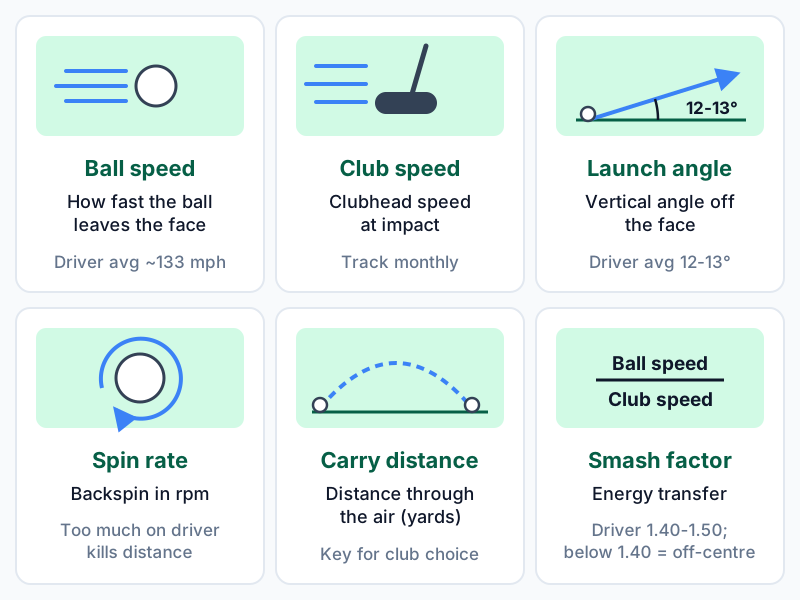
| Metric | What It Measures | Typical Amateur Range | Why It Matters | |--------|-----------------|----------------------|----------------| | Ball speed | How fast the ball leaves the clubface (mph) | About 133 mph (driver) for the average 14.5-handicap male golfer, per TrackMan | Best indicator of strike quality. Consistent ball speed = consistent contact | | Club speed | How fast the clubhead moves at impact (mph) | Varies widely by golfer | Your speed ceiling. Track monthly, not daily, as speed gains come slowly | | Launch angle | Vertical angle the ball leaves the face (degrees) | About 12-13° (driver) for the average male golfer, per TrackMan | Combined with spin, determines trajectory. Matching launch to speed maximises distance | | Spin rate | Backspin in revolutions per minute (rpm) | Varies by club, speed and strike | High spin on a driver kills distance. High spin on a wedge creates stopping power | | Carry distance | How far the ball flies through the air (yards) | Varies by club | The number that matters for club selection. Many golfers overestimate their carry distances | | Smash factor | Ball speed divided by club speed | 1.40-1.50 (driver) | Best single indicator of energy transfer. Below 1.40 on a driver usually means off-centre contact |
Beyond these six, numbers like spin axis, dynamic loft and attack angle are useful for club fitters and better players. For many higher handicappers they're just clutter. Start with the core metrics and add more only if your game needs it.
Individual Launch Monitor Reviews
Garmin Approach R10 - Best Overall
The Garmin R10 is the usual first recommendation for golfers building a home practice setup. At ~£450, it hits the sweet spot between price and genuine usefulness.
It uses Doppler radar and sits 1.8-2.4 m behind the ball. It tracks 12+ metrics, including ball speed, spin rate, launch angle, carry distance, club speed, club path and face angle. The software is where Garmin pulls ahead. E6 Connect comes with five free virtual courses, and the Garmin Golf app builds your club averages over time. Pair it with a home net and the R10 turns a basic hitting bay into a working simulator.
Pros:
- 12+ metrics at the £450 price point
- E6 Connect simulation with five free courses included
- Garmin Golf app stores session data and builds club averages
- Works indoors and outdoors
- Compact enough to fit in a golf bag pocket
Cons:
- Requires 1.8-2.4m of space behind the ball
- Indoor spin accuracy drops slightly vs outdoor readings
- No video integration (data only)
Best For: Any golfer who wants a capable home practice monitor for under £1,000. It's the most common starting point for DIY simulator builds.
Price: £££ (~£450)
Rapsodo MLM2PRO - Best for Visual Feedback
The Rapsodo MLM2PRO combines radar with built-in cameras to give you shot tracer video alongside the usual launch data. Every swing produces a short clip showing the ball's actual flight. If you learn by watching, that's a big help. Seeing your ball start right and curve left makes sense straight away, in a way numbers on a screen often don't.
At ~£550, it costs about £100 more than the R10 in the UK. The software is the other trade-off. Virtual courses and simulator play, including E6 Connect, need Rapsodo's Premium membership (~£166 a year) rather than coming free, as E6 Connect does with the R10. It tracks ball speed, spin rate, launch angle, carry distance, total distance and smash factor.
Pros:
- Shot tracer video on every swing for self-diagnosis
- Works with E6 Connect and Awesome Golf through the Premium membership
- Intuitive app with shot history and club tagging
Cons:
- Virtual course simulation needs a paid subscription
- Requires good lighting for camera features indoors
- Fewer club metrics (no club path or face angle)
Best For: Golfers who learn by watching. If you're trying to fix a slice and want to see exactly what the ball is doing, the shot tracer is worth the trade-off.
Price: £££ (~£550)
Building a practice habit with your new monitor? Use the free Green Streak app to log your sessions and keep your streak. The data only helps if you keep coming back to it.
Swing Caddie SC4 - Best Portable
The SC4 keeps things simple. It tracks ball speed, launch angle, carry distance, total distance, smash factor and spin rate. There's no club path, face angle or video.
What it does have is a built-in display and voice output. Hit a ball, glance at the device and hear your distance called out. You don't need a phone, Bluetooth pairing or an app that might crash. For range sessions, that simplicity is a real advantage.
Pros:
- Built-in display and voice output, so no phone required
- Compact, range-bag friendly
- Spin rate tracking at the ~£600 price point
Cons:
- No simulation software compatibility
- Fewer metrics than the Garmin R10
- Basic app compared to Garmin or Rapsodo
Best For: Range golfers who want quick, reliable numbers without fuss.
Price: £££ (~£600)
FlightScope Mevo+ - Best Premium
The Mevo+ is where consumer monitors start to cross into professional territory. Its 3D Doppler radar with Fusion Tracking technology measures 16+ parameters. Independent reviews rate its data quality and consistency noticeably higher than the £450-£600 monitors, particularly for spin.
It comes with five free courses on the FlightScope app and works with E6 Connect. Indoors, you need metallic stickers on the balls (included) for full spin data. Outdoors, it tracks the full flight without stickers. Owners report the aluminium housing holds its calibration well over time.
Pros:
- 16+ metrics with accuracy close to pro-level devices
- Compatible with E6 Connect and other simulation platforms
- Strong build quality and long-term reliability
Cons:
- ~£2,200 is a significant investment
- Metallic stickers needed for full indoor spin data
- Software subscriptions add ongoing cost
Best For: Low-handicap golfers and premium simulator builds. It's the step up to make when a £450 monitor starts to feel limiting.
Price: ££££ (~£2,200)
Bushnell Launch Pro (GC3) - Best Tour-Level Accuracy
The Bushnell Launch Pro, built on Foresight Sports' GC3 platform, is the most accurate consumer monitor on this list. Three high-speed cameras capture the ball at impact and measure spin rate, spin axis, ball speed and launch angle very precisely. It's built on the same camera approach as the GCQuad, the £15,000 device found in professional fitting bays.
Camera technology has a particular advantage indoors: it doesn't need to watch the ball fly. Everything is measured in the first few inches after impact. That makes the Launch Pro the most accurate indoor monitor here by a clear margin. It connects to FSX Play and Awesome Golf for simulation.
Pros:
- GC3 camera technology delivers tour-level accuracy
- Best indoor accuracy (does not need ball flight)
- Professional-grade data trusted by club fitters
Cons:
- ~£2,800 puts it out of reach for casual golfers
- Club data (speed, path, face angle) requires a subscription add-on
- Simulation software adds ongoing cost
Best For: Serious low-handicappers, club fitters and premium simulator builds where accuracy comes first.
Price: ££££ (~£2,800)
The 19th Hole: A pattern that crops up again and again on r/golf goes like this. A golfer spends £2,000-£3,000 on a premium launch monitor, hits balls for a few weeks, then lists it on the used market. The monitor wasn't the problem. They bought accuracy when what they needed was a habit. A regular practice routine matters far more than the precision of your spin readings. If you haven't yet shown that you'll practise five days a week for three months, buy the cheapest capable monitor. Put the savings into time, not hardware.
Garmin R10 vs Rapsodo MLM2PRO Head-to-Head
These two dominate the budget conversation. Here's how they compare.
| Feature | Garmin Approach R10 | Rapsodo MLM2PRO | |---------|--------------------|--------------------| | Price | ~£450 | ~£550 | | Technology | Doppler radar | Radar + camera hybrid | | Ball Speed | Yes | Yes | | Spin Rate | Yes | Yes | | Launch Angle | Yes | Yes | | Carry Distance | Yes | Yes | | Club Path | Yes | No | | Face Angle | Yes | No | | Shot Tracer Video | No | Yes | | Simulation (E6 Connect) | Yes (5 free courses) | Subscription required | | Built-in Display | No (phone required) | No (phone required) | | Indoor Use | Good (slight spin accuracy loss) | Good (needs lighting) | | Outdoor Use | Strong | Strong | | App Ecosystem | Garmin Golf + E6 Connect | Rapsodo app | | Space Behind Ball | 1.8-2.4m required | 2-2.6m required | | Size | Compact (palm-sized) | Larger (brick-sized) |
The Verdict
Choose the R10 if you want simulation or club data (path and face angle), or you're building a simulator. If you already wear a Garmin GPS watch, the R10 fits neatly alongside it.
Choose the MLM2PRO if you learn visually, because the shot tracer gives you a different kind of feedback. It does need a little more space behind the ball (2-2.6 m against 1.8-2.4 m), which matters in a tight garage.
For many golfers, the R10 wins on overall value. The MLM2PRO isn't a lesser version of it, though. It's a different tool for a different job.
Detailed Comparison Table
| Feature | Garmin R10 | Rapsodo MLM2PRO | Swing Caddie SC4 | FlightScope Mevo+ | Bushnell Launch Pro | |---------|-----------|-----------------|-------------------|-------------------|---------------------| | Price | £££ (~£450) | £££ (~£550) | £££ (~£600) | ££££ (~£2,200) | ££££ (~£2,800) | | Technology | Doppler radar | Radar + camera | Doppler radar | 3D Doppler radar | Photometric (camera) | | Ball Speed | Yes | Yes | Yes | Yes | Yes | | Club Speed | Yes | Yes | Yes | Yes | Subscription add-on | | Spin Rate | Yes | Yes | Yes | Yes | Yes | | Launch Angle | Yes | Yes | Yes | Yes | Yes | | Carry Distance | Yes | Yes | Yes | Yes | Yes | | Club Path | Yes | No | No | Yes | Subscription add-on | | Face Angle | Yes | No | No | Yes | Subscription add-on | | Smash Factor | Yes | Yes | Yes | Yes | Yes | | Shot Tracer Video | No | Yes | No | No | No | | Built-in Display | No | No | Yes | No | No | | Simulation Included | E6 (5 courses free) | Subscription | No | FlightScope (5 courses free) | FSX Play (paid) | | Indoor Accuracy | Good | Good | Fair | Very Good | Excellent | | Outdoor Accuracy | Very Good | Good | Good | Excellent | Very Good | | Ball Stickers Needed | No | No | No | Yes (indoor) | No | | Space Behind Ball | 1.8-2.4m | 2-2.6m | 1-1.5m | 2.4m+ | 0.3m (beside ball) | | Battery Life | ~10 hours | ~8 hours | ~12 hours | ~6 hours | ~5 hours | | Best For | Overall value | Visual feedback | Portability | Premium data | Tour accuracy |
Budget Breakdown by Price Tier
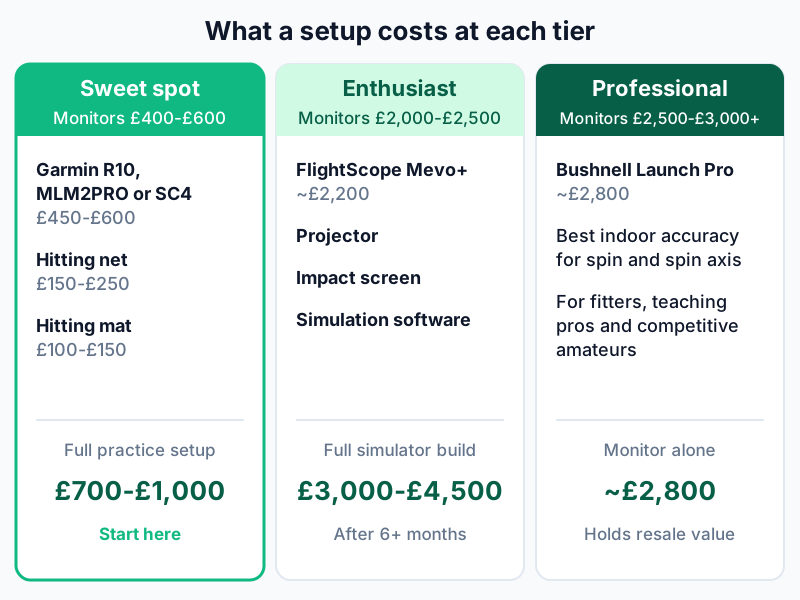
£400-£600 - The Sweet Spot
The Garmin R10 (~£450), Rapsodo MLM2PRO (~£550) and Swing Caddie SC4 (~£600) all sit here. This is where most home golfers should start.
At this price you get accurate ball speed, carry distance and launch angle. Spin is good but not perfect, especially indoors. There are simulation options (the R10 with E6), and all three pair with phone apps that keep your shot data.
A full practice setup at this tier costs roughly £700-£1,000: launch monitor (£450-£600), hitting net (£150-£250) and mat (£100-£150). That's in the region of two years or so of weekly range buckets, and it's there whenever you want it.
£2,000-£2,500 - The Enthusiast Tier
The FlightScope Mevo+ (~£2,200) lives here. You get noticeably better data, more metrics and stronger indoor performance. The upgrade makes sense if you've used a budget monitor for 6+ months and feel held back by the data quality.
At this level you're probably also buying a projector, impact screen and simulation software, so a full simulator build climbs to £3,000-£4,500. That's a serious commitment. I'd only recommend it once you've proved the practice habit with a cheaper setup.
£2,500-£3,000+ - The Professional Tier
The Bushnell Launch Pro (~£2,800) sits at the top. On published specs and independent reviews, it's more accurate than everything below it, particularly for spin rate and spin axis. For a club fitter, teaching pro or competitive amateur, the data quality justifies the price.
For recreational golfers, it's hard to justify on data alone, because the Garmin R10 gives you most of the useful numbers for a fraction of the price. The Launch Pro does hold its resale value well, though. If you buy one and find you're not using it, you should get a good part of your money back on the used market.
Indoor vs Outdoor Performance
The technology decides where each monitor shines. That matters if you're building a home practice setup.
Radar monitors indoors (Garmin R10, SC4, Mevo+) track the ball's early flight and calculate the rest. Indoors, the ball hits the net within a few feet, so the radar has less to work with. Ball speed and launch angle stay accurate, spin accuracy drops slightly, and carry distance is calculated rather than measured.
Camera monitors indoors (Bushnell Launch Pro) capture the ball at impact, so they don't need ball flight at all. Spin, speed and launch are measured directly. For pure indoor accuracy, cameras win.
Outdoors, all five monitors perform well, and radar monitors gain accuracy from seeing the full flight. Reviewers find both the Garmin R10 and the Mevo+ noticeably more accurate outdoors than indoors.
The practical takeaway: if you practise mainly indoors, the R10 or MLM2PRO will be good enough for many golfers. If indoor accuracy is your top priority, the Launch Pro is the clear choice. If you split your time, the Garmin R10 is the most versatile.
Do I Really Need a Launch Monitor to Improve
No. A mirror, a phone filming in slow motion and a good practice routine will take many golfers further than a launch monitor used without a plan. Structure and repetition drive improvement, and the data is a bonus.
A launch monitor adds value in two ways. It takes the guesswork out of distances, and knowing your real carry numbers improves your club selection straight away. It also gives you honest feedback on strike quality, because ball speed and smash factor don't lie.
What it can't do is make you practise. A £2,800 device gathering dust is worth less than a £40 net you use every day. If you already practise regularly, a monitor is a great addition. If you're hoping it will motivate you to start, save your money and build the habit first.
Final Verdict by Category
| Category | Winner | Why | |----------|--------|-----| | Best Overall | Garmin Approach R10 | Plenty of metrics, strong app support and free simulation for about £450 | | Best Visual Feedback | Rapsodo MLM2PRO | Shot tracer video is genuinely useful for self-diagnosis | | Best Portable | Swing Caddie SC4 | Built-in display, voice output, grab-and-go simplicity | | Best Premium | FlightScope Mevo+ | Near tour-level data for around £600 less than the Bushnell Launch Pro | | Best Tour-Level Accuracy | Bushnell Launch Pro | GC3 camera technology sets the accuracy standard | | Best for DIY Simulator | Garmin Approach R10 | E6 Connect integration makes it the easiest simulator brain | | Best Budget Alternative | Rapsodo MLM2PRO | Shot tracer and solid data for about £100 more than the R10 |
My Pick for Most Golfers
The Garmin Approach R10. At ~£450, it gives you more useful data and software than anything else in its class. It works indoors and outdoors, connects to E6 for simulation and builds your club averages over time in the Garmin Golf app.
If you're buying your first launch monitor, start at £450-£600. Prove the habit, then upgrade later. The best launch monitor is the one you use every day, not the one with the longest spec sheet.
Sources & Further Reading
- MyGolfSpy Launch Monitor Testing: Independent, data-driven accuracy comparisons of consumer launch monitors
- TrackMan: What Is Ball Speed?: Average ball speeds for tour players and amateur golfers
- TrackMan: What Is Launch Angle?: Average driver launch angles by handicap
- Garmin Approach R10 Official Specifications: Full specs and supported metrics
- Foresight Sports GC3 Technology Overview: Photometric camera technology and accuracy documentation
- Golf Digest Launch Monitor Reviews: Expert gear evaluations and long-term user testing
- r/golf Launch Monitor Community: Real-world user reviews, accuracy reports, and troubleshooting
Related Articles
- How to Build a DIY Golf Simulator: the companion guide to this article
- Best Golf Nets for Garage Practice
- Best Golf GPS Watches
- How to Practice Golf Effectively
- The Complete Guide to Practicing Golf at Home
- Best Putting Mats for Home Practice
- Best Golf Simulators on a Budget: Complete Buyer's Guide
Frequently Asked Questions
What is the best golf launch monitor under £1,000?
For many golfers, the Garmin Approach R10 (~£450) is the best launch monitor under £1,000. It tracks 12+ metrics, including ball speed, spin rate, launch angle and carry distance. It pairs with E6 Connect for virtual course play and works indoors and outdoors. The Rapsodo MLM2PRO (~£550) is the strongest alternative if shot tracer video is a priority.
Are cheap launch monitors accurate enough for practice?
Yes. Ball speed is usually the most dependable number on budget monitors. Spin is less precise than on premium models, but for tracking trends and learning your real carry distances, budget monitors give you useful, consistent data. For practice, consistency matters more than absolute accuracy.
Do I need a launch monitor to build a golf simulator?
Yes. The launch monitor is the core of any golf simulator, because it provides the ball flight data the software uses to show your shots on screen. The Garmin R10 is the most popular choice for budget builds. Premium builds typically use the FlightScope Mevo+ or Bushnell Launch Pro for higher accuracy.
What is smash factor and why does it matter?
Smash factor is ball speed divided by club speed. It measures how efficiently energy passes from the club to the ball. A perfect driver strike gives a smash factor of around 1.50, and anything below 1.40 usually points to off-centre contact. Tracking smash factor over time shows whether your strike is improving.
Is the Garmin R10 or Rapsodo MLM2PRO better?
The Garmin R10 wins on features: more club data (path and face angle), free E6 Connect simulation and a stronger app set-up. The Rapsodo MLM2PRO wins on visual feedback, with shot tracer video on every swing. Choose the R10 for simulation and depth of data, and the MLM2PRO for visual learning and self-diagnosis.
Can I use a launch monitor at the driving range?
Yes. All five monitors on this list work at the driving range. The Swing Caddie SC4 is the most range-friendly, thanks to its built-in display and voice output. The Garmin R10 and Rapsodo MLM2PRO need a phone connection but work well outdoors.
How much space do I need behind the ball for a launch monitor?
It depends on the monitor. The Garmin R10 needs 1.8-2.4 m behind the ball, the Rapsodo MLM2PRO 2-2.6 m and the FlightScope Mevo+ 2.4 m or more. The Bushnell Launch Pro sits beside the ball, so it needs very little depth. Factor this into your garage or simulator room layout.
Do launch monitors work with foam or limited-flight balls?
Radar monitors (like the Garmin R10 and Swing Caddie SC4) often struggle with foam balls, because their speed and spin are too different from real golf balls. Limited-flight balls like Callaway Strata practice balls work better but may still give less accurate data. For the best results, use real golf balls with a good hitting net.
Disclaimer: This article is for informational purposes only and does not replace professional golf instruction. Individual results will vary based on ability, practice consistency, and physical condition. Consult a PGA professional for personalised swing advice.
Ready to build your practice streak?
Track your sessions, set goals, and improve with Green Streak — completely free.
Get Started Free